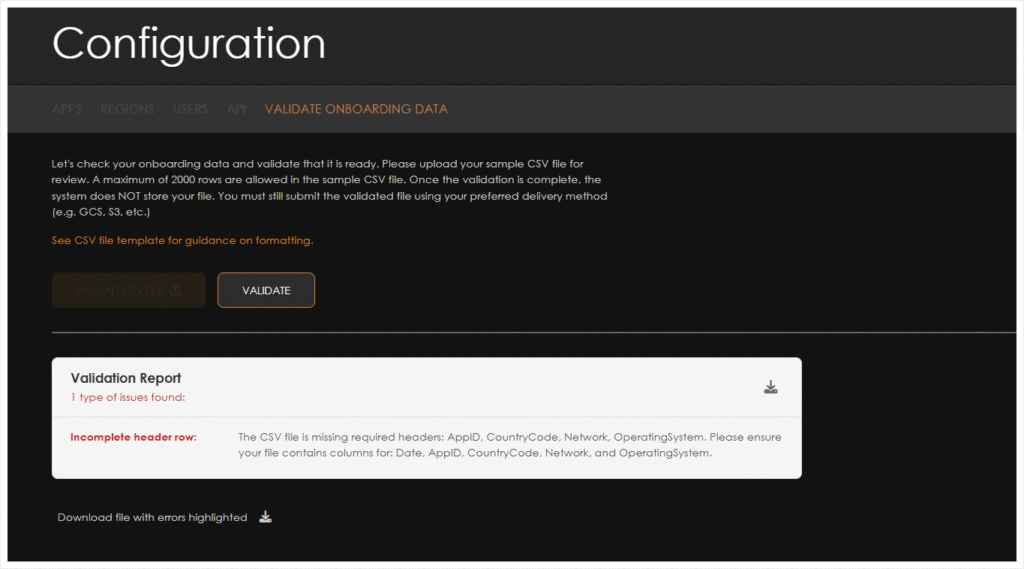
AIM’s Onboarding Data Validation process provides the ability to upload your data and easily validate the format to ensure that the data will be properly ingested into AIM.
Ensure your CSV files follow these guidelines:
Data Structure: Use a flattened cohort format where each cohort value (0, 1, 7, 30, 90, 360) has its own column in a single row, rather than multiple rows with a single cohort column. This format reduces file size and improves processing efficiency.
Column Naming: While you can use any column names, we recommend matching the system field names listed below to simplify mapping. Our mapping module can accommodate different column names with proper configuration.
Required Columns: Not all columns are mandatory. Columns containing _incr_ or _lift_ are only required for Incremental Studies.
Input File Schema
| Dimensions | Non Cohort Metrics | Cohort Metrics | ||||||
|---|---|---|---|---|---|---|---|---|
| full_date | installs | views_0d | revenue_0d | ad_revenue_0d | new_orders_0d | total_orders_0d | registrations_0d | retentions_0d |
| app_id | skad_installs | views_incr_0d | revenue_incr_0d | ad_revenue_incr_0d | new_orders_incr_0d | total_orders_incr_0d | registrations_incr_0d | retentions_incr_0d |
| operating_system | clicks | views_lift_0d | revenue_lift_0d | ad_revenue_lift_0d | new_orders_lift_0d | total_orders_lift_0d | registrations_lift_0d | retentions_lift_0d |
| country_code | impressions | views_1d | revenue_1d | ad_revenue_1d | new_orders_1d | total_orders_1d | registrations_1d | retentions_1d |
| network_name | total_cost | views_incr_1d | revenue_incr_1d | ad_revenue_incr_1d | new_orders_incr_1d | total_orders_incr_1d | registrations_incr_1d | retentions_incr_1d |
| campaign_id | views | views_lift_1d | revenue_lift_1d | ad_revenue_lift_1d | new_orders_lift_1d | total_orders_lift_1d | registrations_lift_1d | retentions_lift_1d |
| campaign_name | revenue | views_7d | revenue_7d | ad_revenue_7d | new_orders_7d | total_orders_7d | registrations_7d | retentions_7d |
| campaign_type | ad_revenue | views_incr_7d | revenue_incr_7d | ad_revenue_incr_7d | new_orders_incr_7d | total_orders_incr_7d | registrations_incr_7d | retentions_incr_7d |
| publisher_name | new_orders | views_lift_7d | revenue_lift_7d | ad_revenue_lift_7d | new_orders_lift_7d | total_orders_lift_7d | registrations_lift_7d | retentions_lift_7d |
| channel | total_orders | views_30d | revenue_30d | ad_revenue_30d | new_orders_30d | total_orders_30d | registrations_30d | retentions_30d |
| registrations | views_incr_30d | revenue_incr_30d | ad_revenue_incr_30d | new_orders_incr_30d | total_orders_incr_30d | registrations_incr_30d | retentions_incr_30d | |
| retentions | views_lift_30d | revenue_lift_30d | ad_revenue_lift_30d | new_orders_lift_30d | total_orders_lift_30d | registrations_lift_30d | retentions_lift_30d | |
| daus | views_90d | revenue_90d | ad_revenue_90d | new_orders_90d | total_orders_90d | registrations_90d | retentions_90d | |
| views_incr_90d | revenue_incr_90d | ad_revenue_incr_90d | new_orders_incr_90d | total_orders_incr_90d | registrations_incr_90d | retentions_incr_90d | ||
| views_lift_90d | revenue_lift_90d | ad_revenue_lift_90d | new_orders_lift_90d | total_orders_lift_90d | registrations_lift_90d | retentions_lift_90d | ||
| views_360d | revenue_360d | ad_revenue_360d | new_orders_360d | total_orders_360d | registrations_360d | retentions_360d | ||
| views_incr_360d | revenue_incr_360d | ad_revenue_incr_360d | new_orders_incr_360d | total_orders_incr_360d | registrations_incr_360d | retentions_incr_360d | ||
| views_lift_360d | revenue_lift_360d | ad_revenue_lift_360d | new_orders_lift_360d | total_orders_lift_360d | registrations_lift_360d | retentions_lift_360d | ||
Uploading Sample Data
- Navigate to Configuration > Validate Onboarding Data.
- Click Upload CSV File.
- Drag and drop the sample CSV file into the provided box.
- Click Upload.
- Click Validate.


Validation Messages:
| Validation Type | Validation | Description | Error Message |
|---|---|---|---|
| Structural | File Format Check | The uploaded file must have a .csv extension. | Invalid file type: Please upload a file with a .csv extension and try again. |
| Empty File Check | The file must contain at least one row of data (not including the header row). | Empty file: Please add your data to the file and re-upload. | |
| Header Row Check | The first row of the CSV must contain valid required headers. The headers are: Date, AppID, BundleID, Operating System, Country Code, Geo, Source, Network, Campaign, Ad Spend, Installs | Incomplete header row: The headers in your file are missing required columns. Please ensure the first row contains these columns: Date, AppID, BundleID, Operating System, Country Code, Geo, Source, Network, Campaign, Ad Spend, Installs. | |
| Required fields | Required fields | The following fields are required. There should be a value in each of these fields: Date, AppID, BundleID, Operating System, Country Code, Geo, Source, Network, Campaign, Ad Spend, Installs | Missing data: The {field_name} field in row [row number] is empty. This is a required field. |
| Data Type | Date field | The format of the date field should be in one of the following formats: – 2024-01-15 (ISO 8601) – 2024-01-15T10:30:00Z (ISO with timezone) – 01/15/2024 (US format) – 15/01/2024 (EU format) – Jan 15, 2024 (Named months) – 2024-01-15 10:30:00 (DateTime) – 15 January 2024 (Full month names) | Invalid date format: The date format is incorrect. |
| Country code | The country code should be a two character country code | Invalid country code: The country code is invalid. In row [row number], the value in the Country Code field must be a two-letter code (e.g., US). | |
| Numeric values | Ad Spend and the metric values (Non-Cohorted and Cohorted) should have numeric values | Invalid data type: In row [row number], the {field_name} field must contain only numbers. | |
| Negative values | Ad Spend and the metric values (Non-Cohorted and Cohorted) should have numeric values and the numbers cannot be negative | Negative numbers: In row [row number], the {field_name} field can contain only positive numbers. | |
| Data Consistency | Operating system | The values for this field can only be: Unknown, android, ios, web. | Invalid operating system: In row [row number], the Operating System field must be one of the following: Unknown, Android, iOS, or web. |
| Campaign structure | If Campaign name is included, then values should be present for “AppID”, “Network”, and “Operating System” | Missing fields: If a Campaign value is provided in row [row number], the AppID, Network, and Operating System fields are required. |